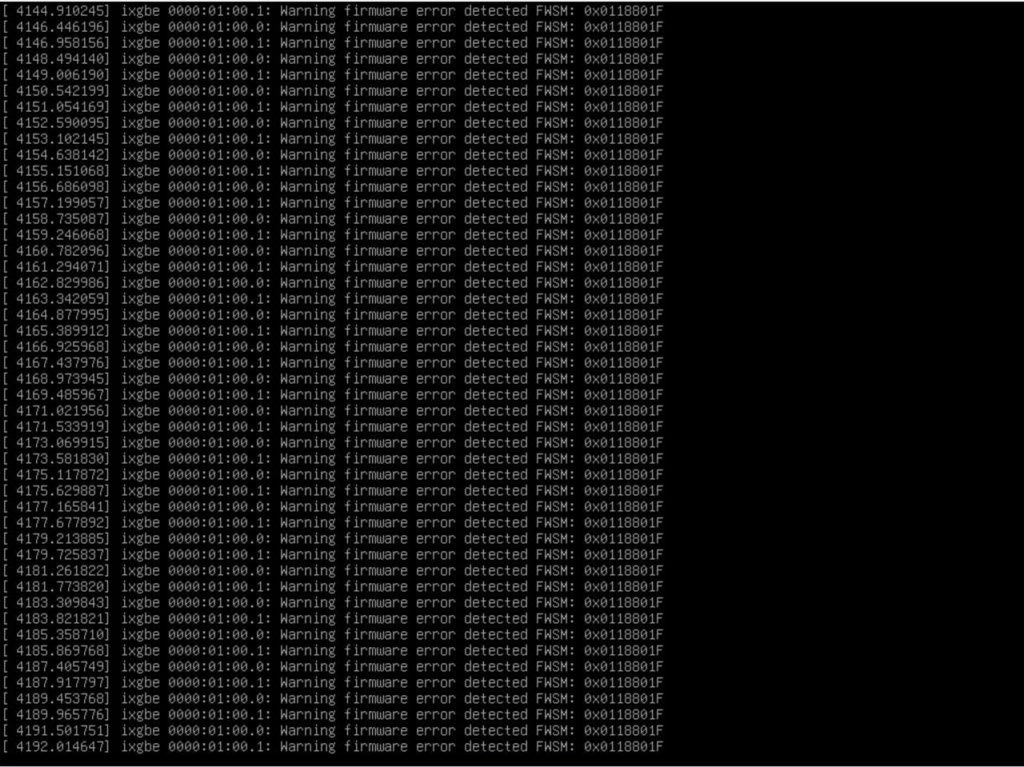
最近在一台 Proxmox VE 主機上遇到 Intel X550 網卡一直噴 ixgbe firmware error log。
錯誤長這樣:
ixgbe 0000:01:00.0: Warning firmware error detected FWSM: 0x0118801F
ixgbe 0000:01:00.1: Warning firmware error detected FWSM: 0x0118801F
這篇記錄我這次怎麼查、怎麼更新 Intel X550 NVM,以及更新後怎麼確認問題已經消失。
環境
這次的環境是 Proxmox VE,網卡是 Intel X550。
先看 PVE 與 kernel:
pveversion
uname -r
我的回應:
pve-manager/8.4.19
6.8.12-30-pve
確認網卡型號:
lspci -nn | grep -i 'x550\|ethernet'
我的回應:
01:00.0 Ethernet controller [0200]: Intel Corporation Ethernet Controller X550 [8086:1563]
01:00.1 Ethernet controller [0200]: Intel Corporation Ethernet Controller X550 [8086:1563]
問題現象
查 kernel log:
journalctl -k -g 'Warning firmware error detected FWSM' --since '5 minutes ago' --no-pager
會一直看到類似這種訊息:
ixgbe 0000:01:00.0: Warning firmware error detected FWSM: 0x0118801F
ixgbe 0000:01:00.1: Warning firmware error detected FWSM: 0x0118801F
先確認目前網卡 firmware:
ethtool -i eno1
ethtool -i eno2
更新前我的狀態是:
driver: ixgbe
version: 6.8.12-30-pve
firmware-version: 0x800007b5
bus-info: 0000:01:00.0

driver: ixgbe
version: 6.8.12-30-pve
firmware-version: 0x800007b5
bus-info: 0000:01:00.1
比較容易誤判的是,網卡 counters 不一定會有錯。
ip -s link show eno1
ip -s link show eno2
ethtool -S eno1 | egrep 'rx_errors|tx_errors|crc|missed|timeout|dropped'
ethtool -S eno2 | egrep 'rx_errors|tx_errors|crc|missed|timeout|dropped'
我這台當時看到的是:
rx_errors: 0
tx_errors: 0
rx_dropped: 0
tx_dropped: 0
rx_crc_errors: 0
rx_missed_errors: 0
tx_timeout_count: 0
也就是說,封包 counters 看起來正常,不代表 firmware warning 是假的。
問題根因
FWSM 是 Intel ixgbe driver 讀到網卡 firmware status register 後印出來的警告。
我這次看到的 FWSM: 0x0118801F 不是 journald 自己產生的訊息,也不是 rsyslog 記錄錯誤。它是 kernel driver 從硬體狀態讀到 firmware error indication 後印出的 log。
所以不要把修復方向放在降低 log 量或把訊息 filter 掉。那只是看不到問題,不是修好問題。
我先試過更新到當時可用的 Proxmox kernel,重開後還是一樣,所以最後處理的是 Intel X550 NVM。
下載 Intel X550 NVM Update
Intel 官方下載頁:
https://www.intel.com/content/www/us/en/download/19360/non-volatile-memory-nvm-update-utility-for-intel-ethernet-adapters-550-series-linux.html
我使用的檔案:
X550_NVMUpdatePackage_v3_70_Linux.tar.gz
版本與 checksum:
Version: 3.70
SHA256: 4E8413E005BD3FC23BD833B09D2B7E4A44341BC27D17BB1372FA7CAFEE83E5A3
下載後先驗 checksum:
sha256sum X550_NVMUpdatePackage_v3_70_Linux.tar.gz
正確應該會看到:
4e8413e005bd3fc23bd833b09d2b7e4a44341bc27d17bb1372fa7cafee83e5a3 X550_NVMUpdatePackage_v3_70_Linux.tar.gz
這邊要注意,如果是 OEM server,理論上優先找 OEM 提供的 firmware。我的情況是 OEM 頁面沒有找到可用的 X550 NVM package,而且 Intel 工具 inventory 與 cfg 都有對應,才繼續用 Intel 這包。
Step 1:解壓縮並先做 inventory
先把檔案放到主機上:
mkdir -p /root/firmware
cp X550_NVMUpdatePackage_v3_70_Linux.tar.gz /root/firmware/
cd /root/firmware
tar xzf X550_NVMUpdatePackage_v3_70_Linux.tar.gz
cd X550/Linux_x64
chmod +x nvmupdate64e
先跑 inventory,不要直接更新:
./nvmupdate64e -i -o /root/firmware/x550_inventory_before.xml
我的 inventory 重點是這樣:
<Instance vendor="8086" device="1563" subdevice="001A" subvendor="1458" bus="1" dev="0" func="0" display="Intel(R) Ethernet Controller X550-T2">
  <Module type="NVM" version="800007B5" update="0">
</Instance>
<Instance vendor="8086" device="1563" subdevice="001A" subvendor="1458" bus="1" dev="0" func="1" display="Intel(R) Ethernet Controller X550-T2">
  <Module type="NVM" version="800007B5" update="0">
</Instance>
這裡至少要確認幾件事:
- 工具有認到你的 X550。
- vendor / device 是你預期的網卡。
- 目前 NVM 版本有被列出來。
- 不要在 inventory 都不正常的情況下硬刷。
Step 2:確認 nvmupdate.cfg 有對應版本
我當時的 NVM 是 800007B5,所以先查 cfg:
grep -n -B4 -A4 '800007B5' nvmupdate.cfg
我的回應重點:
NVM IMAGE: dSGVL_B0_AT2_NCSI_3p70.bin
EEPID: 8000184D
REPLACES: 800007B5
RESET TYPE: POWER
這代表目前這個 NVM 800007B5 有被這份設定列為可替換版本,更新目標是 8000184D。
如果你的版本沒有出現在 REPLACES,或工具沒有明確對應你的卡,建議先停下來,不要硬刷。
Step 3:執行更新
更新前請先確認幾件事:
- 要有 BMC / IPMI / 實體 console。
- 更新過程不要中斷。
- 更新後通常需要真正 power cycle,不只是 reboot。
- 如果是 production 主機,先把 VM 或服務正常關掉。
執行更新:
cd /root/firmware/X550/Linux_x64
./nvmupdate64e -u -b -c nvmupdate.cfg -o /root/firmware/x550_update.xml
我的更新結果重點:
<Module type="PXE" version="2.4.45" previous_version="2.3.58">
  <Status result="Success" id="0">All operations completed successfully.</Status>
</Module>
<Module type="EFI" version="8.0.5" previous_version="5.1.19">
  <Status result="Success" id="0">All operations completed successfully.</Status>
</Module>
<Module type="NVM" version="8000184D" previous_version="800007B5">
  <Status result="Success" id="0">All operations completed successfully.</Status>
</Module>
<PowerCycleRequired> 1 </PowerCycleRequired>
重點是最後這行:
<PowerCycleRequired> 1 </PowerCycleRequired>
這表示要真正斷電再上電,普通 reboot 不一定夠。
Step 4:Power Cycle
如果是 Proxmox,先看 VM 狀態:
qm list
把需要停的 VM 正常關機:
qm shutdown <vmid> --timeout 180
確認服務都停好後,讓主機正常關機:
sync
systemctl poweroff
接著透過 BMC / IPMI 確認 power off,再開機:
ipmitool -I lanplus -H <bmc-ip> -U <user> chassis power status
ipmitool -I lanplus -H <bmc-ip> -U <user> chassis power on
如果沒有 BMC,就只能在 OS 關機後實體斷電,等 30 秒以上再上電。
Step 5:更新後驗證
開機後先確認 firmware:
ethtool -i eno1
ethtool -i eno2
我的更新後結果:
firmware-version: 0x8000184d, 1.3052.0
firmware-version: 0x8000184d, 1.3052.0
再確認這個 boot 是否還有 FWSM warning:
journalctl -q -k -b -g 'Warning firmware error detected FWSM' --no-pager | wc -l
我的結果:
0
最後再看 counters:
ip -s link show eno1
ip -s link show eno2
ethtool -S eno1 | egrep 'rx_errors|tx_errors|crc|missed|timeout|dropped'
ethtool -S eno2 | egrep 'rx_errors|tx_errors|crc|missed|timeout|dropped'
我這台更新後仍然是 0 errors / drops / CRC / missed / timeout。
結論
這次的重點是:ixgbe Warning firmware error detected FWSM 不要只當成 log 很吵。
我這台的處理結果是:
- 更新 kernel 沒有解。
- 確認
FWSM是 driver 從網卡 firmware status 讀到的錯誤。 - 使用 Intel X550 NVM Update Package
3.70更新 NVM。 - 從
0x800007b5更新到0x8000184d, 1.3052.0。 - 做真正 power cycle 後,這個 boot 的
FWSMwarning 變成0。
另外補充一下,這次修好的是 FWSM firmware error,不代表所有網路問題都會一起消失。像我這台還有另一個 1Gbps negotiation 問題,那就要另外查 switch port、線材或對端設定,不要混在一起看。
參考連結:
https://www.intel.com/content/www/us/en/download/19360/non-volatile-memory-nvm-update-utility-for-intel-ethernet-adapters-550-series-linux.html